Choose which of your phones ring, and turn on Do Not Disturb
Control exactly which of your devices ring for incoming calls, or silence everything at once with Do Not Disturb.
Who this is for: everyday users and admins. You can manage this for yourself, or an admin can set it up on your behalf.
Before you start
- An extension assigned to your account.
- If you use more than one device (a desk phone, the browser webphone, and/or the mobile app), it helps to know which ones you actually want ringing.
Steps
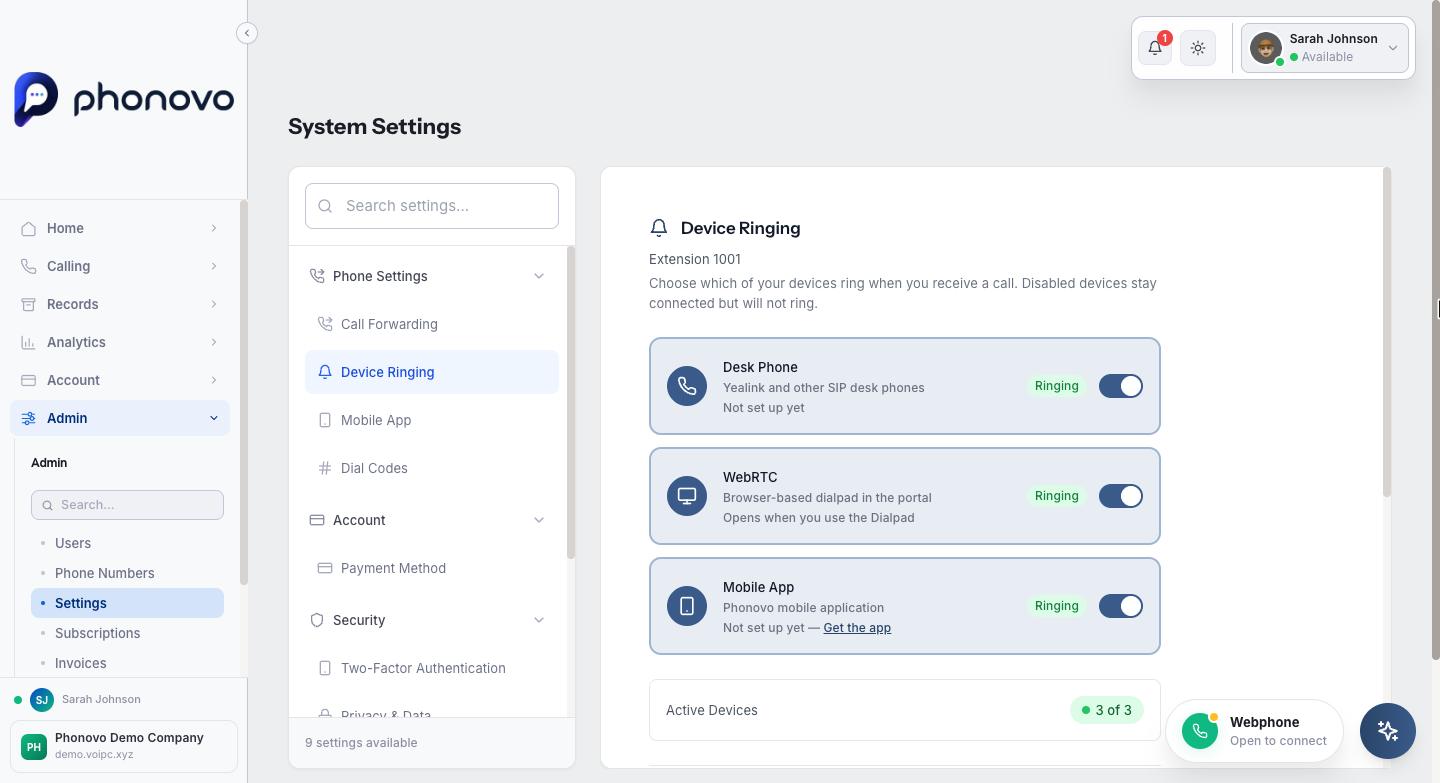
- Click your name in the top right and select Settings, then choose Device Ringing under Phone Settings. This page is scoped to your own extension automatically.
- You'll see a toggle for each device type registered to your extension: Desk Phone (Yealink and other SIP desk phones), WebRTC (the browser-based Dialpad in the portal), and Mobile App. Each shows Ringing or Silent depending on its current state.
- Under each device, a second line shows whether it's currently connected. This is separate from the Ringing/Silent badge above it, which is only the choice you've made. Desk Phone and Mobile App show Registered while that device is connected, or Not set up yet if it isn't currently connected (even one that was working earlier can show this if it's since gone offline), with a Get the app link next to Mobile App in that case. WebRTC shows Connected while the browser Dialpad is open, or Opens when you use the Dialpad the rest of the time. Since it only connects while the Dialpad is open, that's its normal resting state, not a fault. If this line is missing, connection information is only temporarily unavailable for all your devices at once, not a sign of a problem with any one device.
- Turn a device off if you don't want it to ring. It stays registered and connected, it just won't ring for incoming calls. A summary near the bottom shows how many of your devices are currently active (for example "2 of 3"), and a warning appears if you turn all of them off, since calls will then go straight to voicemail or your no-answer forwarding instead of ringing anywhere.
- Select Save Changes to apply your choices.
- To silence everything at once without touching individual devices, go to Extensions in the sidebar, find your extension, select the Configure button, then open the DND tab.
- Switch on Enable Do Not Disturb. While it is on, your devices do not ring. Forward all calls takes priority: if it is enabled, calls go to your forwarding number. Otherwise, calls go to voicemail. If forwarding is off and there is no usable voicemail box, callers hear busy. You can still make outgoing calls as normal. A status badge at the bottom of the tab confirms whether you're currently in Do Not Disturb or Available.
- Select Save Changes, and switch the toggle off again whenever you're ready to receive calls normally.
Your status can also switch Do Not Disturb on automatically. By default, only Do Not Disturb silences your phones; you can choose other statuses in Settings > Status & Do Not Disturb. See Your status and Do Not Disturb for the choices, Teams statuses and the portal notice explaining where your calls go.
Related
- Use star codes from your phone
- Get the Phonovo mobile app
- Using your phone
- My desk phone won't register
Ask Olivia
You can also ask Olivia, the in-portal assistant, to walk you through this.